


Shopping List - Buy Me a Pie!
4.71.07K Reviews
App Specs
- Version
- 3.5.37
- Updated On
- License
- Free
- Downloads
- 1,000,000+
- Developer
- BUZZWORTHY VIBE COMPANY, LTD.
- Categories
- Shopping
- Platform
- Android
Screenshots

 Analysis by AppCompare
Shopping can be a real headache, especially when your list is all over the place. That's why I decided to give Shopping List - Buy Me a Pie! a whirl. I've heard folks rave about it, so I thought, why not see if it lives up to the hype?
Readability and a quick first look
What matters most to me in a shopping-list app is whether I can understand the list at a glance, without stopping in the middle of an aisle to work out where I put something. Buy Me a Pie! keeps its focus on the list rather than surrounding it with unrelated shopping content. Its color coding can make a long list easier to scan, though color is best treated as an extra cue rather than the only way to tell items apart.
That distinction matters if you have trouble distinguishing colors or shop in a hurry. I’d keep item names specific—“whole milk” rather than just “milk,” for example—so the words do the essential work and color helps with grouping. Before relying on the app for a big shop, I’d also try adding and checking off a few items at home. That gives you a chance to see whether the text and controls feel comfortable on your own screen and at your preferred display settings.
First Impressions
Downloading Shopping List - Buy Me a Pie! was a breeze. The app is available on both Android and iOS, so no matter your device, you're covered. Once installed, I was welcomed with a bright and colorful interface. It’s intuitive and doesn’t bombard you with unnecessary distractions. It's like they knew I didn't need another app trying to complicate my life.
The first feature that caught my eye was the ability to sync across devices. Imagine adding an item on your phone, and it magically appears on your partner's tablet. Genius, right? This feature alone makes it a game changer for families or roommates sharing shopping duties.
Getting Down to Business
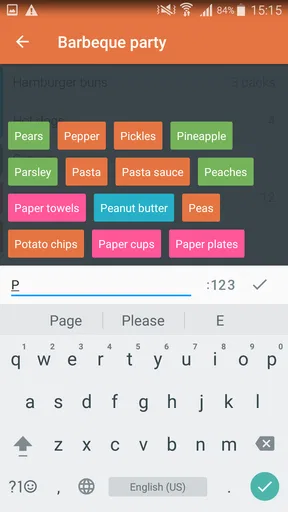
Creating a list is straightforward. You just tap, type, and boom, your item is added. There's also a nifty autocomplete feature that suggests items as you type, saving you time and effort. It's like the app reads your mind - I started typing "banan" and it completed it to "bananas". Handy!
Autocomplete is most useful for familiar, repeated groceries: it can reduce typing when I’m rebuilding a weekly list, but I still check the suggested wording before adding it. A suggestion can be close without being the exact product or quantity I meant. I find it helps to enter distinguishing details in the item name when they matter, such as a particular variety or size, rather than assuming a short suggestion will tell another shopper enough.
Worth Reading Before You Choose

EA SPORTS FC Mobile 26 Is a Bigger Football Game, but It Takes Time

Flipboard Shows What News Apps Must Do Beyond the Feed

Switching to Android Auto Means Rethinking Your Driving Routine

Google Calendar Makes a Crowded Week Easier to Manage

Ludo King Makes the Most of the Minutes Between Plans

Baby Panda World Brings Quick Play to Modern Phones, but Its Game Library Feels Busy
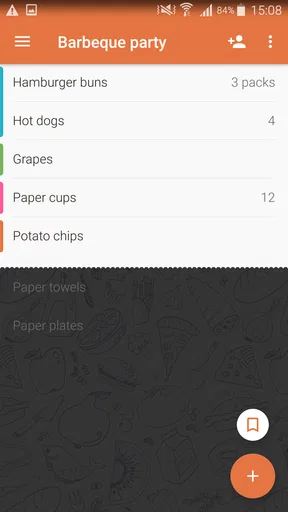
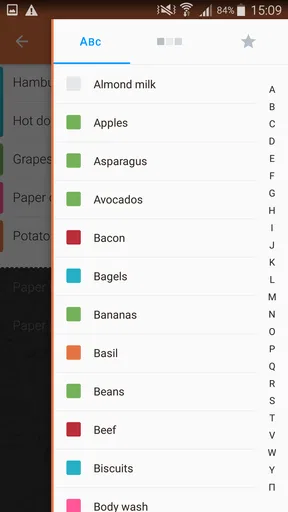
One thing I noticed is the color coding. It allows you to categorize your items. For example, you can have all your fresh produce in green, dairy in blue, and snacks in red. It's a small touch, but it makes scanning your list super easy when you’re darting through aisles.
Motor and sensory considerations
For someone who finds typing difficult, the app’s voice input may seem like an appealing shortcut, and it can be convenient when your hands are occupied at home. In my experience, though, it is not dependable in a noisy place. I wouldn’t make it the only way I add items, particularly if I’m near traffic, in a busy store, or speaking while other people are talking. Typing a short item or using an autocomplete suggestion is a more predictable fallback when voice recognition gets a word wrong.
There is a useful trade-off here: voice can reduce the effort of entering a list, but it needs a sufficiently quiet setting and a quick check afterward. I’d speak one item at a time and review the result before moving on, rather than dictate a long sequence and assume every word landed correctly. If touch input itself is uncomfortable, try the basic add-and-check-off routine before committing to a full grocery run; the app’s simple approach helps, but it cannot remove the physical effort of interacting with a phone.
Features That Stand Out
Let's talk about the cloud synchronization again. This feature is seamless. I tested it by adding a few items on my phone while my tablet sat idle. Within seconds, everything was updated on the tablet. No lag, no fuss.
Another feature worth mentioning is the ability to share lists. Whether you're sending someone out for a quick errand or planning a big family dinner, you can share your list directly via email or SMS. You can even invite someone to collaborate on a list in real-time. So, if you're brainstorming BBQ essentials with a friend, they can add items too. Pretty neat!
The practical value of sharing is less about having a clever feature and more about avoiding two people buying the same thing. I’d use one shared list for the household’s ordinary staples, then add the less common ingredients for a particular meal when the plan is settled. That way, someone making a last-minute addition can still contribute without turning every grocery decision into a group conversation. For a one-off errand, sending the list is simpler; for shopping that changes as people remember things, collaboration makes more sense.
Situational access: from home planning to the shop
A realistic routine might start after dinner, when I notice that breakfast basics are running low. I add them at home, while it’s quiet, and a housemate can add an item before heading out the next day. At the store, I can use the list as a prompt instead of trying to remember what we discussed. If the shop is crowded or I need to move quickly, clear item names and familiar color groups are more useful than trying to reorganize everything on the spot.
This kind of list is particularly suitable for people who shop for a household, share errands, or regularly buy many of the same groceries. It can also help someone who finds it easier to follow a written prompt than to recall a series of items from memory. I would not assume that it replaces every other planning tool, though: a paper list may be easier for someone who prefers not to use a phone while shopping, and a more specialized meal-planning system may suit someone who wants recipes and nutrition details alongside groceries.
For a quick comparison with the usual alternatives, paper is immediate and needs no setup, but it cannot automatically keep two shoppers’ copies aligned. A general notes app can hold a list, yet it may require more manual sorting and lacks the grocery-focused touches I use here, such as item suggestions and color grouping. Buy Me a Pie! sits between those choices: it keeps the task focused on shopping and adds shared, synced lists, while remaining less suited to people who want a broader household planner.
Keeping It Simple
One of the things I appreciate about Shopping List - Buy Me a Pie! is its simplicity. It doesn’t try to be more than what it is. No unnecessary bells and whistles. It’s focused on making your shopping experience smoother.
There's no clutter, no ads popping up every two seconds, and no confusing menus to navigate. It's just you and your list, which is refreshing in a world where apps often do too much.
That restraint is a real advantage for a straightforward grocery routine, but it also sets expectations. I wouldn’t choose this as a substitute for a detailed pantry database, recipe organizer, or store-comparison tool. Its strength is helping me keep track of what to buy and coordinate with another person, not deciding what meals to make or where each product is cheapest. If those extra jobs are important, a specialized alternative may be a better fit even if it takes more time to learn.
A Few Things to Consider
Now, no app is perfect, and while I enjoyed using Shopping List - Buy Me a Pie!, there are a few things to consider. For instance, while the free version is quite functional, some advanced features require a subscription. If you're someone who loves premium features, you might want to consider that small investment.
It is a free shopping app from BUZZWORTHY VIBE COMPANY, LTD., and it has a 4.7 average from around 34,000 ratings. More than a million installs suggest it has found an audience, but popularity doesn’t tell me whether its particular workflow suits you. The app is rated for Everyone, and in-app purchases range from 99 cents to $24.99 per item. I’d start with the basic list-making and sharing routine, then decide whether any paid extras matter to the way you shop rather than paying just because the option is there.
The current version is 3.5.37, and it runs on Android 7.0 or later. That makes checking your device’s system version a sensible first step before installing. The app has been available since August 20, 2013, so it is not a brand-new experiment, but what I’d judge day to day is whether list entry, synchronization, and shared use behave reliably on my devices.
Also, while the app is generally bug-free, I did experience a minor hiccup with the voice input feature. It’s not always accurate, especially in noisy environments. But hey, we all have those off days, right?
Remaining barriers and who should skip it
The main friction I’d plan around is not complicated setup; it is making sure the list remains useful when conditions are less than ideal. A noisy shop can undermine voice input, color coding may not communicate enough on its own, and a shared list only helps if everyone involved actually checks it. If another shopper prefers paper, does not want to use a phone for errands, or needs much more than a simple list, this may not be the right household choice.
I’d also be cautious about relying on sync as the only copy of a time-critical list before testing the routine with the people who will use it. Add a few ordinary items, check that each person understands how to contribute, and see whether changes appear where expected. That small trial reveals more than installing the app right before a large shop. If the basic workflow feels awkward on your device, an app’s popularity will not make it a better fit.
For a person who is sensitive to visual clutter, the uncluttered presentation is a plus, but bright colors may not be comfortable for everyone. I’d lean on clear labels, keep categories consistent, and avoid putting an entire complicated shop into a single undifferentiated list. These are practical ways to make the list easier to use, not a guarantee that it will meet every access need. The best test is whether you can read, add, and mark items comfortably in the setting where you actually shop.
Final Thoughts
All in all, Shopping List - Buy Me a Pie! is a solid app for anyone looking to streamline their shopping experience. It’s user-friendly, efficient, and keeps everything organized. Whether you're shopping solo or coordinating with others, this app has got your back. If you're tired of crumpled paper lists or trying to remember everything in your head, give this app a shot. It might just change the way you shop.
If you’re ready to take the plunge, you can download Shopping List - Buy Me a Pie! from the App Store or Google Play. Happy shopping!
Pros
- User-friendly interface simplifies list creation.
- Syncs across devices for family sharing.
- Offers color-coded categories for easy sorting.
- Automatic cloud backup prevents data loss.
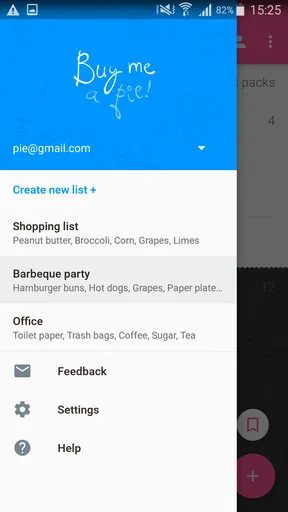
- Supports multiple lists for different stores.
Cons
- Limited customization for list appearance.
- Requires internet for real-time syncing.
- Ads can be intrusive in free version.
- No barcode scanning feature available.
- Limited integration with other shopping apps.
FAQs for Shopping List - Buy Me a Pie!
What features does Shopping List - Buy Me a Pie! offer?
Shopping List - Buy Me a Pie! provides users with a streamlined way to create and manage shopping lists. Key features include list synchronization across devices, customizable categories, and an intuitive interface. Users can also share lists with family members, ensuring everyone is on the same page when it comes to grocery shopping.
Is the app available on both Android and iOS platforms?
Yes, Shopping List - Buy Me a Pie! is available for both Android and iOS devices. This cross-platform availability ensures that you can use the app regardless of your device type, making it convenient for families or groups using different operating systems to stay connected.
Does the app require an internet connection to function?
Shopping List - Buy Me a Pie! does not require an internet connection for basic list creation and management. However, features like list synchronization across devices and sharing lists with others do need an internet connection to function properly, ensuring real-time updates.
Are there any in-app purchases or subscriptions?
The app offers a free version with basic features, but to unlock premium features such as advanced list management tools and ad-free experience, users can opt for in-app purchases or a subscription model. This allows users to choose the level of functionality that best suits their needs.
How user-friendly is the interface of the app?
The interface of Shopping List - Buy Me a Pie! is designed with simplicity and usability in mind. Its intuitive design allows users to quickly add items, categorize them, and manage their lists without a steep learning curve, making it suitable for users of all ages and tech familiarity levels.


